
 One moment, not a session
A spike is saved as a single moment: the time you logged it. There is no timer, no in-progress card and no stop button, so there is nothing to come back to and close. If one lasted a while you can add an end time later in the Journal, but it is never asked.
Whether your tinnitus is always there and sometimes louder, or comes and goes, you answer once during setup. It only changes the words the app uses.
 What it sounds like, and what came with it
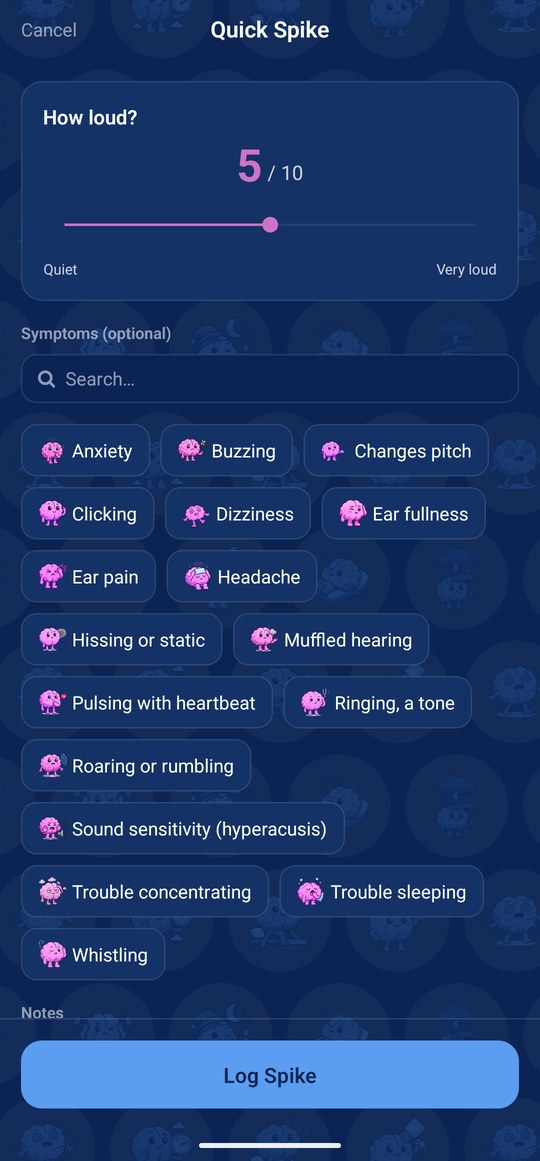
The Symptoms page lists the sounds people describe: a ringing tone, hissing or static, buzzing, roaring or rumbling, pulsing with your heartbeat, clicking, whistling, and a sound that changes pitch. Under them is what can come with a spike: ear fullness, sound sensitivity (hyperacusis), muffled hearing, dizziness, headache, ear pain, trouble concentrating, trouble sleeping and anxiety. A sound is one tap. For what came with it you can also say mild, moderate or severe. All of it is optional.
The loudness page is a 0 to 10 slider from Quiet to Very loud. A spike with only a loudness counts for every statistic in the app.
 Tell it in your own words
Paint the picture is the first page of the full log. Type or speak freely, tap Find matches, and the app picks out the sounds, symptoms, triggers and reliefs it recognises, where you were and what you were doing, and the loudness if you mention one, for you to keep or remove. With Premium the AI reads the whole description; without it, the app matches the words it knows. The microphone is optional; without it you type.
No reminders, on purpose
Paying attention to tinnitus tends to make it louder, so TinnitusMe never asks you to check. No daily check-in, no reminder to log, no question about whether it is still there. Notifications are off unless you switch one on, and the only one on offer tells you when a new pattern is found.
Where it lives in the app
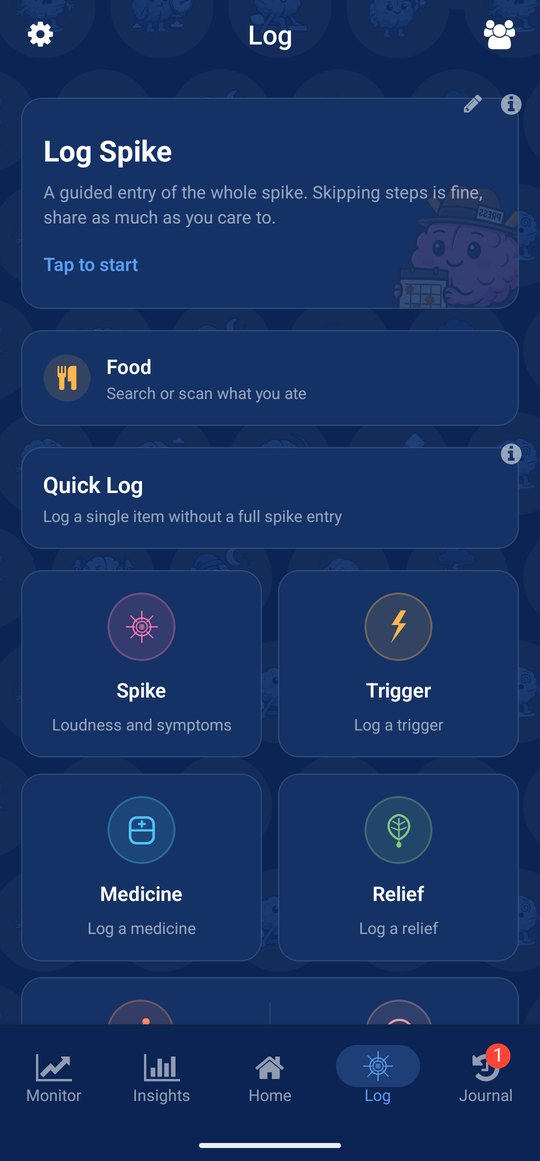
The log button sits first on Home, and Log Spike sits at the top of the Log tab. Both open the guided entry: Paint the picture, Symptoms, Loudness, Triggers, Reliefs, Locations, Activities, Missed activities, Notes, then Review. Further down the Log tab, Quick Log holds short forms for a spike with loudness and symptoms, a trigger, a medicine, a relief, an activity or a missed activity. The pencil on the Log Spike card lets you hide or reorder the pages. Past spikes are in the Journal, where you can edit the time or add an end time.
What it needs from you
A tap when it gets louder, and a loudness. Every other page is optional, and the app never reminds you. Logging happens on the phone, as there is no watch app. A late entry lands on the time you give it. Voice is optional; with Premium the AI reads your own words, without it the app matches the words it knows.